Showing posts with label Communication. Show all posts

Friday, January 25, 2013

0 ProxyDroid 2.6.6


v2.6.6 update:
2.6.6
1. FIX: forcing close issues on some devices
2.6.4
1. FIX: minor bug fixes
2.6.3
1. FIX: Android 4.2 compatibility issues
2.6.2
1. FIX: some bugs
2.6.1
1. UPDATE: new DNS cache module
2. UPDATE: enhanced UI for ICS
3. UPDATE: enhanced bypass function
4. UPDATE: enhancement in auto connecting function
2.5.0
1. UPDATE: A new option for bypassing selected apps instead of proxying them Overview:
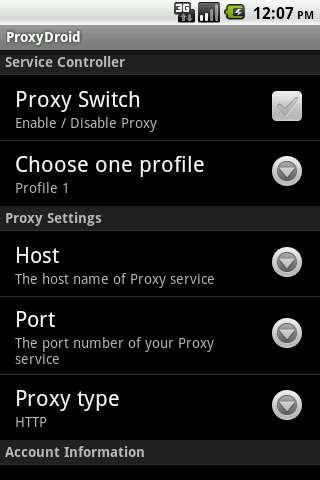
ProxyDroid is an app that can help you to set the proxy (http / socks4 / socks5) on your android devices.
PLEASE ROOT YOUR DEVICES FIRST
TIPS: Press MENU button to find a “Recover” option that would help you to recover / reset the proxy settings when you get something wrong.
** FEATURES **
1. Support HTTP / HTTPS / SOCKS4 / SOCKS5 proxy
2. Support basic / NTLM / NTLMv2 authentication methods
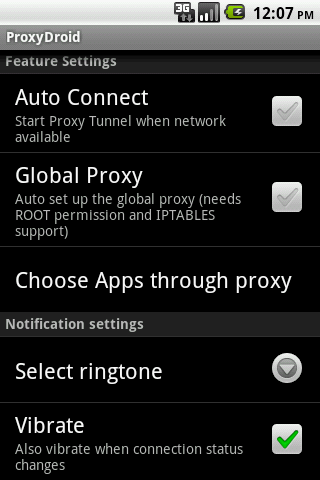
3. Individual proxy for only one or several apps
4. Multiple profiles support
5. Bind configuration to WIFI’s SSID / Mobile Network (2G / 3G)
6. Widgets for quickly switching on/off proxy
7. Low battery and memory consumption (written in C and compiled as native binary)
8. Bypass custom IP address
9. DNS proxy for guys behind the firewall that disallows to resolve external addresses
10. PAC file support (only basic support, thanks to Rhino)
ProxyDroid is an open source software and distributed with many other open source projects, here is a list of them:
* cntlm – Authentication Proxy: http://cntlm.sourceforge.net/
* redsocks – transparent socks redirector: http://darkk.net.ru/redsocks/
* netfilter/iptables – http://www.netfilter.org/
* transproxy – transparent proxy for HTTP: http://sourceforge.net/projects/transproxy/
* stunnel – multiplatform SSL tunneling proxy: http://www.stunnel.org/
As an open source project, you can check out all source codes from our project site.
Tags: proxy, socks4, socks5, iptables, http, https, redsocks, cntlm, NTLM, NTLMv2, iptables, Transparent Proxy

Wednesday, January 16, 2013

0 WhatsApp to Text


WhatsApp to Text

WhatsApp to Text allows you to export your WhatsApp messages to Plain Text, CSV, Excel and HTML file formats and yes, those files can be read in your phone or computer! Your exported files can be saved on your phone’s SD card or sent to your email as attachment. It is fast and easy to backup your WhatsApp messages!
- Features:
* Support Emoji characters in text format and can be displayed in Emoji supported OS (Windows 7, Mac OS X 10.7 or later)
* Export your messages and Emoji icons completely in HTML format
* Export and send to your email as attachment directly
* Filter by chat
* Filter by message type
* Sorting messages
* Export to Normal plain text (*.txt)
* Export to CSV, comma-separated values (*.csv)
* Export to Excel 2007/2010 workbook (*.xlsx)
* Export to HTML web page (*.html)
* Selectable date and time format
* Support Unicode UTF-8 encoding with/without BOM
* Support Windows, Unix, Mac plain text new line format
- Sample Output screenshots can be found on our Facebook page
- WhatsApp to Text and SMS to Text share same file format, those exported WhatsApp messages can be restored to your phone as SMS using SMS to Text
Tips:
WhatsApp to Text exports your messages based on your WhatsApp chat history backup. Please follow the steps below to make the up-to-date chat history backup:
1. Open WhatsApp
2. Press the Menu button
3. Click “Settings”
4. Click “Chat preferences”
5. Click “Chat history backup”

Copy and paste this url
http://www.appsapk.com/wp-content/uploads/downloads/WhatsApp%20to%20Text.apk

Tuesday, January 15, 2013

0 SMS Backup + 1.4.7


v1.4.7 update:
* Improved login flow, supports 2-step authentication
* Translation updates
Overview:
Automatically backup SMS, MMS and call log entries using a separate label in Gmail / Google Calendar. It is also possible to restore SMS and call log entries back to the phone (MMS not supported yet).
Remember to enable IMAP in Gmail.
Please note that auto backup might not work reliably when SMS Backup+ is installed on the SD card. Future version will hopefully fix this, in the meantime please move it back to phone memory if possible.
For those of you worried about app permissions: there is a detailed explanation in the FAQ section of the website.
Also, please consult the FAQ on the website before sending me an email.
Download From QR Code:   QR Code App:Barcode Scanner
QR Code For SMS Backup + 1.4.7
Download From Market Link:
download button SMS Backup + 1.4.7 on Android Market
Download From apktop:
download button Download SMS Backup + 1.4.7

0 Zello Walkie Talkie


Zello Walkie Talkie

Zello — live conversations
Turn your phone or tablet into a walkie talkie with this lightning fast free push-to-talk (PTT) app, which works between Android, iPhone, Blackberry, and PC. Talk to your contacts privately or join public channels to engage in a hot debate.
Zello features:
- Real-time streaming, high quality voice
- Contacts availability and text status
- Public and private channels for up to 300 users
- Option to map hardware PTT button
- Bluetooth headset support (selected phones)
- Voice history
- Call alert
- Push notifications

copy and paste this url and tab in address bar in your browser
http://www.appsapk.com/wp-content/uploads/downloads/Zello%20Walkie%20Talkie.apk

0 GO SMS Pro Widget


GO SMS Pro Widget

But, to enjoy more powerful SMS funtion, you need to install the latest version of GO SMS Pro, which is the most popular SMS/MMS app in Android Market.
** How to add GO SMS Widget on your home screen?
- Long press on your home screen, press the Widget option and choose GO SMS widget. Make sure your home screen has enough room for the widget.
Available Size:
-icon
-4×2
Actions:
- View
- Reply
- Write new message
- Call
- Delete
- Mark as read
- Widget settings, includes changing style
**Note**
Some funtions need you to bind to v3.59 or the newest version of GO SMS Pro, if your haven’t installed or the version is too old, we suggest you to dowload or update your GO SMS Pro main program.

Copy and Paste this url and tab in address bar in your browser
http://www.appsapk.com/wp-content/uploads/downloads/GO%20SMS%20Pro%20Widget.apk
 

Kadublicek Copyright © 2011 - |- Template created by O Pregador - |- Powered by Blogger Templates